


The first two posts in this series lived downstream: audio overviews and the rest of the Studio tools both start from “the retrieved chunks for your selection.” This post goes upstream to the question those posts quietly assumed an answer to: how does a raw source become chunks in the first place?
That’s ingestion. It’s the least glamorous part of the system and arguably the most important — everything the assistant can say, quiz you on, or narrate is bounded by what made it through this pipeline. And “a source” is no longer just a PDF. Today the system ingests PDFs, Word docs, Excel workbooks, PowerPoint decks, web pages, YouTube videos, audio files, and pasted notes — each through a purpose-built adapter, all converging on the same searchable store.
The interesting engineering is how it stays sane across eight wildly different formats. The answer is a two-phase pipeline and a pluggable adapter contract. Let’s walk both.
The shape of the problem
Every source type has to end up in the same place: embedded chunks in ChromaDB, tagged with enough metadata to find them again. But the front half of ingestion is radically different per type — you parse a PDF, transcribe an audio file, readability-extract a web page, pull captions from a video. The trick is to make each source type do whatever it takes to produce clean text, then force everything through one shared tail.
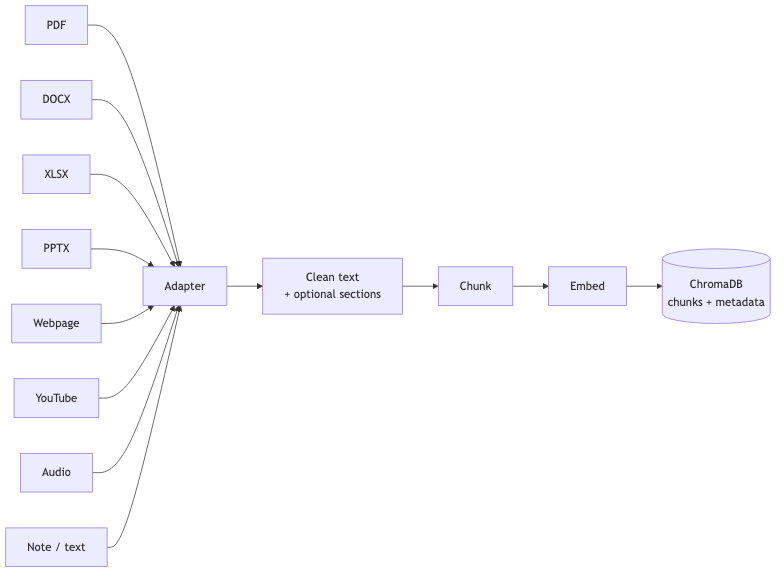
Everything to the right of the adapter is shared. That convergence is the whole design: make every source type produce text, and the rest of the pipeline never has to know where it came from. A YouTube transcript and a textbook chapter are indistinguishable by the time the Studio sees them — they’re just chunks.
Two phases: stage, then commit
Ingestion isn’t one request. It’s two, with a human (or a confidence threshold) in the middle.
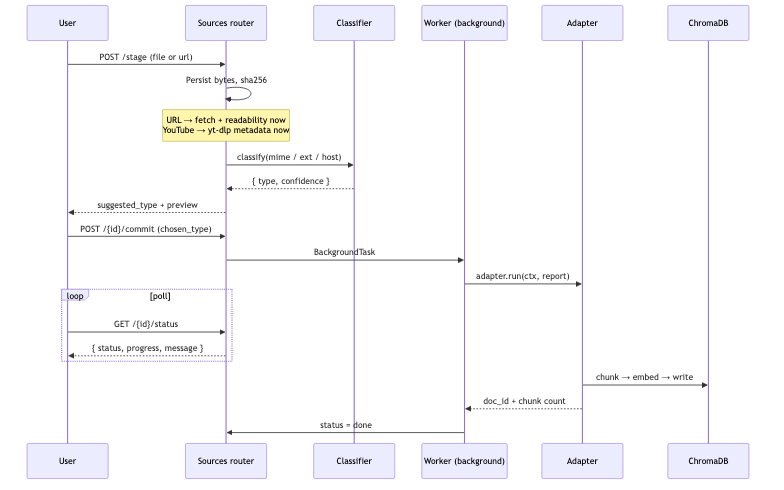
Phase 1 — stage. POST /api/sources/stage accepts either a file upload or a URL. The bytes land on disk, get a SHA-256, and go to a classifier. Two source types do real work at stage time so the user sees a genuine preview before committing: a URL is fetched and readability-extracted immediately, and a YouTube link has its metadata pulled via yt-dlp (no download yet). The response includes a suggested_type and a confidence score.
Phase 2 — commit. POST /api/sources/{id}/commit confirms the type — either the user picks it from a chooser, or, when the classifier’s confidence is high (≥0.8), the UI can auto-confirm silently. Commit kicks off a background worker; the frontend polls GET /api/sources/{id}/status for status, progress, and a human-readable message until it’s done or failed.
Why split it? Because classification is a guess, and guessing wrong about “is this a spreadsheet or a note?” changes the entire extraction strategy. Staging first lets the system show its work — “I think this is a PowerPoint deck, 92% sure” — and lets the user correct it before any expensive parsing happens.
The classifier
The classifier is deliberately conservative — it looks at MIME type, filename suffix, and URL host, and returns a type plus a 0–1 confidence:
if input_kind == "file":
    if mime == "application/pdf" or name.endswith(".pdf"):
        return Classification("pdf_book", 0.95, "mime=application/pdf")
    if name.endswith(".docx"):  return Classification("docx", 0.9, "ext=.docx")
    if mime.startswith("audio/"): return Classification("audio", 0.85, "audio mime")
    # ...falls back to a generic "note" for unknown text-bearing files
if input_kind == "url":
    if "youtube.com/watch" in url or "youtu.be/" in url:
        return Classification("youtube", 0.95, "youtube host")
    return Classification("webpage", 0.8, "generic url")
High confidence means “auto-confirm is safe”; low confidence means “show the human a chooser.” It never silently does something expensive it isn’t fairly sure about.
The adapter contract
This is the heart of the design. Every format is handled by an adapter — a stateless object that knows how to take one staged artifact through extraction → chunking → embedding → indexing. They all satisfy the same tiny contract:
class Adapter(Protocol):
    artifact_type: str            # e.g. "pdf_book", "youtube"
    def run(self, ctx: AdapterContext, report: StatusReporter, *,
            conn_factory) -> AdapterResult: ...
The worker never contains format-specific logic. It looks the adapter up in a registry by the confirmed type, hands it a context, and lets it run:
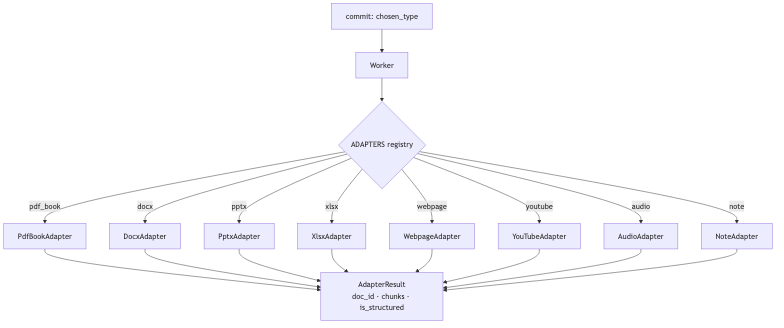
Three properties fall out of this contract, and they’re what make the system maintainable:
Adapters don’t touch state directly. They emit progress through a
StatusReporter(report(status=, progress=, message=)); the worker owns the terminaldone/failedflip. Separation of concerns between “do the work” and “record the outcome.”Every adapter returns the same result shape — a 16-hex content-hash
doc_id, a chunk count, and anis_structuredflag. Downstream code never branches on source type.Adding a format is adding a file. Write an adapter, register it in the
ADAPTERSdict under itsartifact_type, teach the classifier to recognize it. No worker changes, no pipeline changes.
What each adapter actually does
The adapters differ only in the front half — how they turn their format into text, and whether they can discover structure (sections) along the way. Structure matters: it’s what powers “generate an overview of Chapter 4” or “just this slide.”
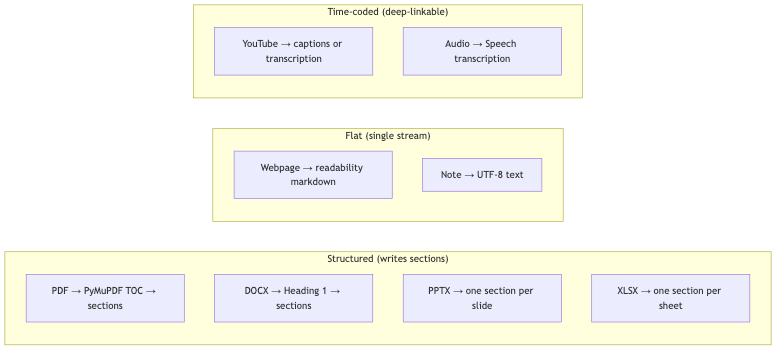
A quick tour:
pdf_bookreuses the existing PDF chunking path, then opens the file a second time with PyMuPDF to pull the table of contents. If there’s a TOC, each entry becomes a section row and the doc is marked structured; if not, it’s a single flat document.docxwalks paragraphs withpython-docxand treats everyHeading 1as a section boundary. No headings → one flat section.pptxmakes each slide a section, titled by the slide’s title placeholder (or “Slide N”), with the body built from the slide’s text frames plus the speaker notes. Always structured — a deck is inherently sectioned.xlsxmakes each worksheet a section, and — nicely — detects a header row and serializes subsequent rows askey: valuepairs so the embedding model sees field-aware context instead of a naked grid of numbers.webpageingests the markdown that was already readability-extracted (viatrafilatura) at stage time, tagged with the canonicalsource_url. Flat.notehandles.txt/.md/pasted text — UTF-8 decode, reuse the shared chunker, one flat stream. The trivial case, and it still rides the same rails.audiotranscribes the file with Azure Speech Fast Transcription, groups the returned phrases into chunks, and — crucially — storesstart_ms/end_mson each chunk so a player can deep-link to the exact moment a passage was spoken. It also caches the audio for replay.youtubeis captions-first: it prefers uploader subtitles, then auto-captions (in a configurable language order), parsing the VTT into time-coded chunks. Only if no captions exist does it download the audio and fall back to the same Azure transcription path theaudioadapter uses. Free and accurate when captions exist; robust when they don’t.
Those last two are worth pausing on: because audio and video chunks carry millisecond timestamps, the same “just chunks” abstraction that powers text search also enables “jump to 4:12 in the video where they explain this.”
The shared tail (once, for everyone)
Everything below the adapter is identical no matter the source:
Content-hashed identity. The
doc_idissha256(bytes)[:16]. Re-ingesting the same source is idempotent — same bytes, same ID, no duplicate chunks.One embedding function. All chunks go through the same Azure
text-embedding-3-smallfunction used by both the write path and the read path, so query vectors and document vectors always come from the same model.A rigid metadata schema. Every chunk carries
scope,doc_id,source_type,source_name, section info, and (for A/V) time codes. Chroma’s filters are picky about missing keys, so every field is always present —""or-1when it doesn’t apply.A catalog + projects. A
documentsrow is the canonical record;document_sectionsholds the structure;project_membersties a source into a project with refcounting, so the same source shared across projects is stored once.
When an adapter fails
Multi-step extraction fails in the middle sometimes — a caption download 404s, a transcription times out. The worker treats a failed adapter as a transaction to roll back: it computes the prospective doc_id, deletes any document_sections rows and any Chroma chunks that adapter had already written, and flips the row to failed with the error message. The one exception: if a documents row already exists for that doc_id, it leaves the chunks alone — they belong to a previously successful copy, not this failed run. No orphaned vectors, no half-ingested sources polluting search.
The takeaway
Good multi-format ingestion is mostly about funnel discipline plus a clean seam. The funnel: make each format’s front half do whatever source-specific work is needed to produce clean text (parse, transcribe, extract), then force everything through one shared chunk → embed → store tail with a rigid metadata schema. The seam: a dead-simple adapter contract so the worker orchestrates and the adapters specialize, and adding “support PowerPoint” is writing one file and registering it.
That’s why the system went from PDF-only to eight formats without the pipeline turning into a swamp. The intelligence lives at the edges — in eight small adapters that each know one thing well — while the center stays boring, uniform, and easy to reason about. The chunks the Studio narrates and quizzes are only as good as the extraction done here, and each adapter gets to be excellent at exactly one job.
Thanks for reading. If you want a deeper teardown of any single adapter — the YouTube captions-first fallback, or the XLSX field-aware serialization — reply and let me know which.