


In the first post we followed a single Studio feature — the audio overview — from a content selection all the way to a stitched, captioned MP3. This time we zoom out. Because the audio overview isn’t a one-off: it’s the loudest member of a whole family of tools. Quizzes, study guides, FAQs, briefing docs, mind maps, and flashcards all live in the same Studio panel, and they all ride the same spine.
That’s the interesting part. On the surface these outputs couldn’t look more different — an interactive multiple-choice quiz versus a zoomable mind map versus a Markdown study guide. Underneath, they’re near-identical. Every one of them is the same three-beat move:
Assemble the content — pull the retrieved chunks for the current selection.
Ask the LLM in a very specific shape — JSON with an exact schema, or Markdown with an exact structure.
Hand that shape to a React module built to render it.
The engineering value is in that middle beat: getting the model to reliably emit the right information in the right format so a dumb, predictable frontend component can just render it. This post is about how that contract works, how the pieces are wired, and how we add a new tool without reinventing anything.
The shared pipeline
Here’s the spine every Studio tool sits on:

Notice what doesn’t change from tool to tool: the content source is the same retrieved-chunk mechanism from Series 1, the LLM call goes through the same thin wrapper, everything is cached to disk keyed by a hash of the inputs, and the result is handed to a component whose only job is to render one shape. What changes is the prompt and the contract — and, therefore, the module on the other end.
That single wrapper, _call_llm, is worth a mention because it quietly absorbs a lot of cross-model pain:
def _call_llm(model_name, prompt, temperature=0.7, max_tokens=8192,
              json_mode=False, cost_label="studio"):
    kwargs = dict(model=model_name, messages=[{"role": "user", "content": prompt}],
                  temperature=temperature, max_tokens=max_tokens)
    if json_mode:
        kwargs["response_format"] = {"type": "json_object"}
    response = litellm.completion(**kwargs)
    # ...best-effort token + USD cost logging by cost_label...
    return response.choices[0].message.content or None
Two small details do a lot of work. json_mode flips on the provider’s JSON-object response format so structured tools get back parseable JSON instead of prose with a code fence. And litellm.drop_params = True (set once at startup) lets us swap models freely — gpt-5* only accepts temperature=1, the o-series rejects max_tokens — without every generator breaking. One wrapper, every model, per-tool cost attribution via cost_label.
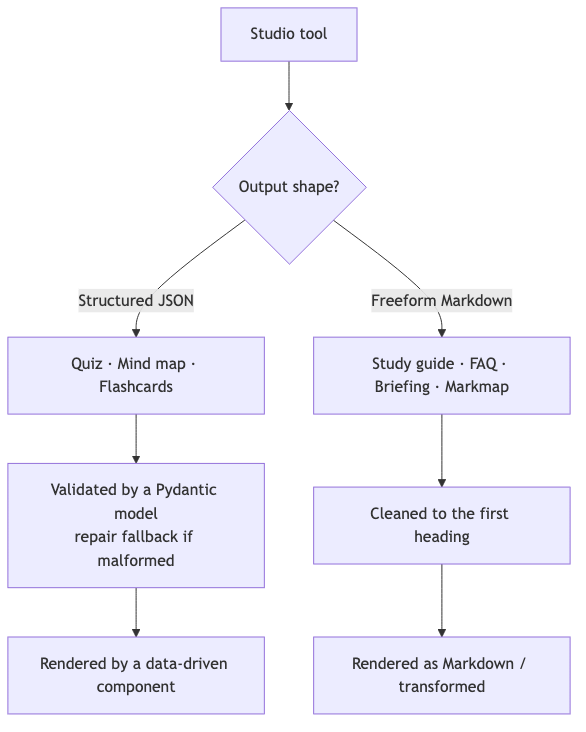
Two output contracts
Every Studio tool commits to one of two output shapes. That choice drives everything downstream — how we validate it, and what kind of React module consumes it.
Contract A: structured JSON
For anything the UI needs to interact with — grade a quiz, lay out a graph, flip a card — freeform prose is useless. We need fields. So the prompt spells out an exact schema, we turn on JSON mode, and we validate the result against a Pydantic model before it’s allowed anywhere near the frontend.
The quiz is the cleanest example. The prompt asks for one JSON object with a questions array, each item carrying a question, four options, and an answer that must be one of those options. Then:
validated_quiz = Quiz.parse_raw(text)   # Pydantic enforces the shape
quiz_dict = validated_quiz.dict()
If the model returns something malformed, we don’t just fail — we hand the broken JSON back to the model and ask it to repair it (the same belt-and-suspenders trick from Series 1). Structured tools get a second chance before giving up.
The mind map goes one step further and uses two LLM calls: first it summarizes the content into an executive digest, then it turns that digest into a node/edge graph. Summarize-then-structure produces a cleaner, higher-level map than asking for graph JSON straight from raw text. The contract it emits is exactly what a graph library wants:
{
  "nodes": [{ "id": "1", "data": { "label": "HL Tauri" } }],
  "edges": [{ "id": "e1", "source": "1", "target": "2" }]
}
Contract B: freeform Markdown
For anything that’s fundamentally prose — a study guide, an FAQ, a briefing doc — JSON would just be in the way. Here the contract is “return only Markdown, no preamble,” and validation is a light touch: a helper strips any chatty lead-in the model adds before the first heading.
def _clean_markdown_response(content: str) -> str:
    """Strip any leading text before the first Markdown heading."""
    match = re.search(r'#.*', content, re.DOTALL)
    return match.group(0) if match else content
The interesting hybrid is the markmap. It’s Markdown — but Markdown with a very particular internal structure: nested headings and lists where every leaf is a link of the form [HL Tauri](#query/What%20is%20HL%20Tauri%3F). That URL scheme isn’t decoration; it’s a contract with the frontend. When you click a node, the app decodes the query and drops it straight into chat. The LLM is, in effect, pre-writing follow-up questions and wiring them to a click handler — all encoded in a Markdown link.
Across both contracts, one line ties every prompt back to Series 1’s localization work: a shared _language_directive injects “generate this artifact in ” so a quiz, a study guide, or a mind map all come back in the user’s language without any per-tool special-casing.
The React modules
Each contract has a matching component whose entire job is to render one shape. They’re deliberately dumb — no business logic, just presentation of a known structure.
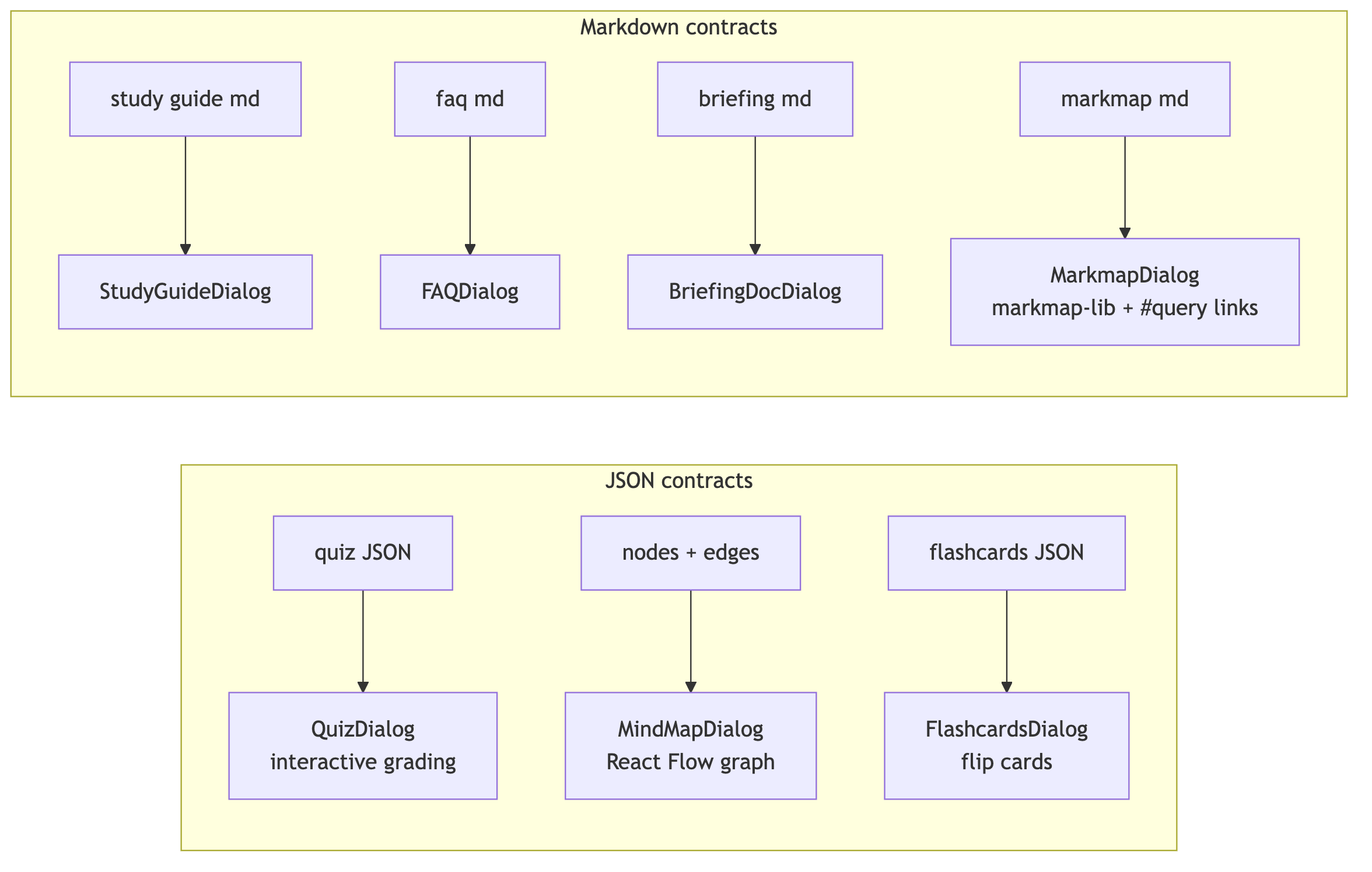
A few show the range:
QuizDialogtakesquiz.questions, tracks the user’sanswersin local state, and on submit compares each pick toq.answerto compute a score. Because the contract guaranteesansweris one ofoptions, the grading logic is a one-liner — no fuzzy matching, no surprises.MindMapDialoghandsnodesandedgesstraight to a React Flow graph. The component never parses text; it receives layout-ready data because the LLM produced layout-ready data.MarkmapDialogfeeds the Markdown tomarkmap-lib’sTransformer, renders it withMarkmap.create, and attaches a click handler that intercepts#query/...links and forwards them toonSendMessage— turning a static mind map into a launchpad for chat.
The pattern is the same each time: the model did the hard part (structure), so the component only does the easy part (render).
Wiring it together: the async task + poll
Some of these generations are quick; some (a 20-question quiz, a two-call mind map) take real time. So the backend doesn’t block. Every generator endpoint kicks off a background task and immediately returns a task_id; the frontend polls until it’s done. Cached results short-circuit the whole thing and come back inline.
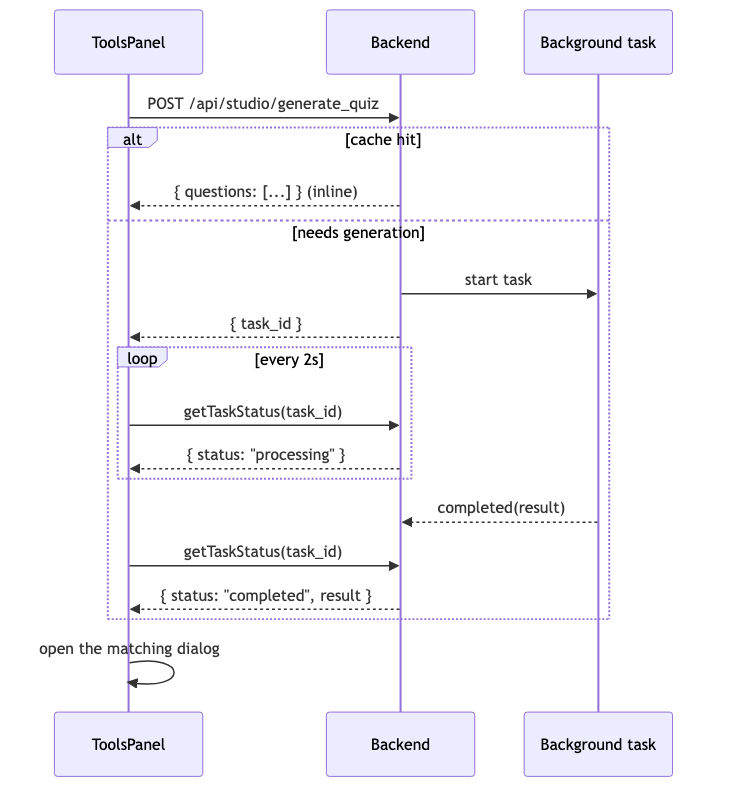
On the frontend, ToolsPanel is the hub. Each tool has a handleGenerateX that follows an identical rhythm: grab the source text, call api.generateX, and then either poll on task_id or, if the response already contains the payload (a cache hit), open the dialog immediately.
const response = await api.generateQuiz(sourceText, getSelection(), selectedModel);
if (response.task_id) {
  const poll = setInterval(async () => {
    const s = await api.getTaskStatus(response.task_id);
    if (s.status === 'completed') { clearInterval(poll); setQuiz(s.result); setQuizDialogOpen(true); }
    else if (s.status === 'failed') { clearInterval(poll); /* surface error */ }
  }, 2000);
} else if (response.questions) {      // cached: payload returned inline
  setQuiz(response); setQuizDialogOpen(true);
}
Swap generateQuiz/setQuiz/questions for the mind-map equivalents and you have handleGenerateMindMap. The rhythm never changes.
Adding a new tool
Because every tool rides the same spine, extending the Studio is a checklist, not an adventure. Say you want a “key terms glossary.” You touch exactly these layers:
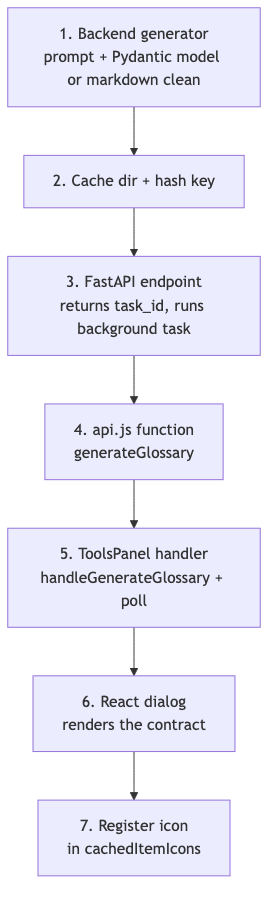
Pick a contract. Interactive → JSON + a Pydantic model. Prose → Markdown +
_clean_markdown_response.Write the generator in
studio_tools.py: a format-specific prompt (including_language_directive), the_call_llmcall, validation, and disk caching keyed by a hash ofsource_text + language + model.Add the endpoint in
main.pythat starts a background task and returns{ task_id }.Add the
api.jsfunction that POSTs to it.Add the
ToolsPanelhandler — copy an existinghandleGenerateX, rename three things.Add the dialog that renders your shape.
Register an icon so it shows up in the saved-resources list.
No new infrastructure. No new caching strategy. No new polling logic. The spine already handles retrieval, model selection, cost logging, localization, caching, and async orchestration — a new tool just declares its contract and its renderer.
The takeaway
The Studio looks like six or seven distinct features. It’s really one feature with six or seven costumes. The unifying idea is a strict contract between a language model that produces structure and a UI component that consumes it — JSON when the interface needs to compute, Markdown when it needs to read. Get that contract right and the model does the thinking while the frontend stays refreshingly boring.
That boring frontend is the goal. Every hour spent making the LLM emit exactly the right shape is an hour the React side doesn’t spend parsing, guessing, or error-handling. The intelligence lives in the prompt and the schema; the components just draw.
Next in the series, we’ll dig into the retrieval layer itself — how content becomes chunks, how those chunks are embedded and stored, and how the same store quietly powers both chat and everything in the Studio.
Thanks for reading. If there’s a specific tool — the mind map’s two-call chain, the markmap’s clickable queries — you’d like a deeper teardown of, reply and let me know.