


When Google’s NotebookLM went viral for turning dry PDFs into shockingly natural podcast conversations, I had the same reaction as everyone else: how does this actually work?
So I built my own. And then I kept going — well past what NotebookLM does out of the box at the time. Now clearly notebookLM has new functionality. Easily replicated albeit.
It started as something personal: my daughter couldn’t access NotebookLM, so I built her a version she could use here at home. At the time I was working at Google, a customer who couldn’t embed NotebookLM wanted the same kind of functionality — and that need turned my side project into a working demo of how to build it yourself.
Eventually I left Google and joined Microsoft. This has sat idle for some time, but as a forcing mechanism to understand Azure AI Foundry, I decided to change the way this works. The project evolved. I abstracted the LLM layer so it could switch from Gemini to Azure AI Foundry, added support for multiple models (auto-detected), built in multi-language support, and reworked ingestion to handle documents, URLs, media, and more. What you see here is the result — not a production-ready application, but structured well enough to get there if it needed to.
NotebookLM hasn’t stood still either — it has since grown to accept many of the same kinds of sources this project handles, from webpages to media. But the point was never to out-feature Google; it was to understand how these pieces fit together, and to have a version I fully controlled and could extend in any direction I wanted.
The result is an Intelligent Educational Assistant: upload your sources, chat with them, and generate a whole studio’s worth of learning material with one click. It speaks a dozen languages. It cites its sources. It reaches out to real academic databases when it needs to. And because of one design decision I’ll explain near the end, running it costs almost nothing.
This post is the guided tour — the what, the how, and the why it’s cheap. There’s also a 13-minute end-to-end demo at the bottom that walks through every feature, in multiple languages, live. I will record further functionality soon - uploading content, how it detects and separates out structured documents, how it ingests URLs, and media like youtube/and audio files. For now - here is how it works high level, with a quick (well that is relative) demo.
Let’s dig in.
The Big Picture
At its heart, the app is three core services working together:
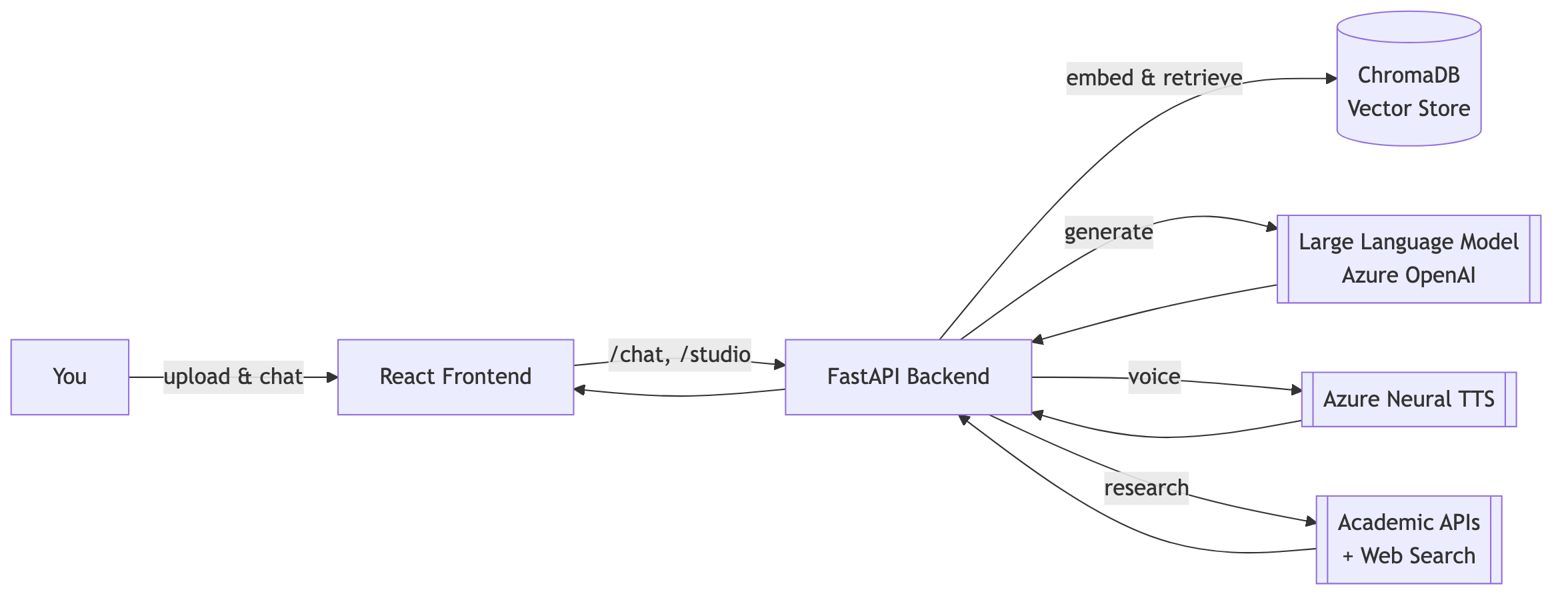
‘Three ingredients, endless combinations:
A vector database that makes your documents searchable by meaning, not just keywords. I use Chroma - as I am running this locally in Docker.
A large language model that reasons over what it retrieves and writes like a patient tutor.
A text-to-speech engine that turns a script into a two-host podcast that sounds like real people.
Everything else — the chat, the studio tools, the languages, the caching — is orchestration on top of those three pillars.
Part 1: Talking To Your Documents
Upload a textbook chapter, a research paper, a slide deck, a webpage, or even a YouTube video, and the app quietly does something clever behind the scenes: it chunks the content into overlapping passages, converts each one into a mathematical fingerprint (an embedding), and stores those fingerprints in a vector database.
Now when you ask a question, the app doesn’t keyword-match. It finds the passages whose meaning is closest to your question, hands them to the language model, and asks it to answer using only what was retrieved.
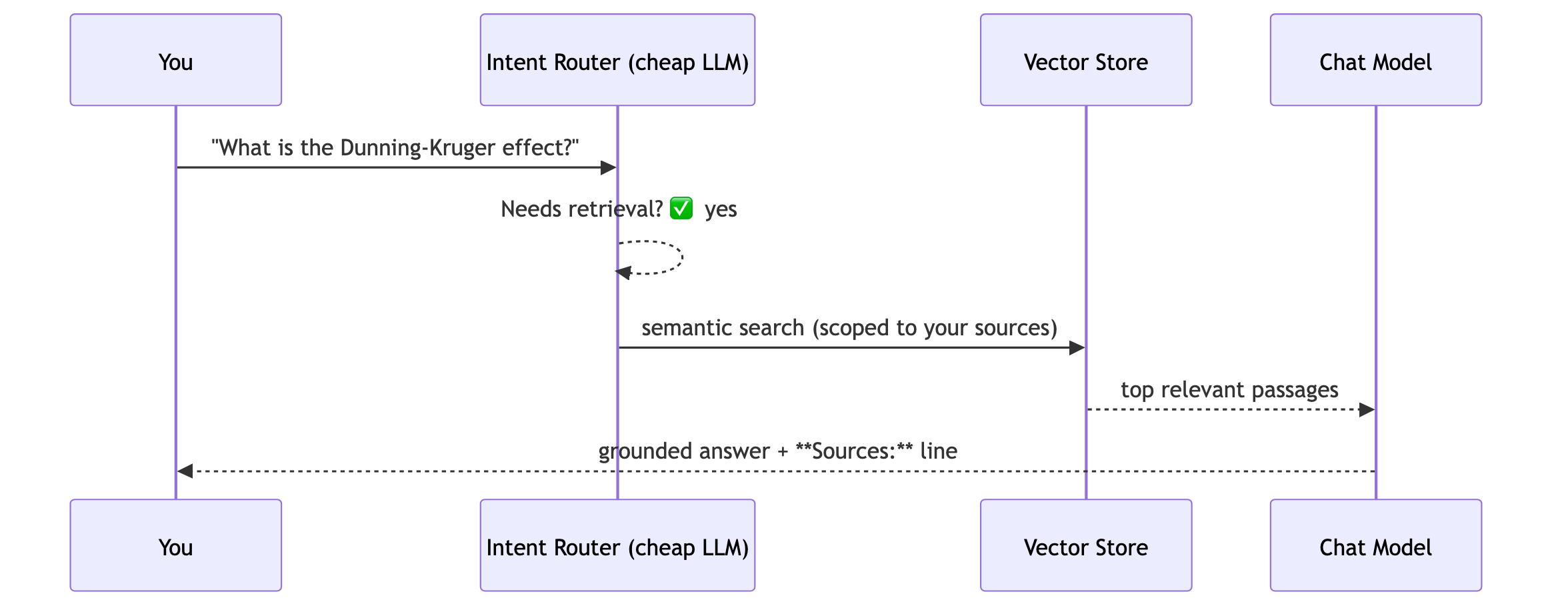
A few things make this more than a toy:
A router model decides whether to search at all. Small talk and follow-ups don’t waste a retrieval call. A cheap, fast classifier makes that call before the expensive model runs.
Answers are grounded and cited. When retrieval shaped the answer, the response ends with a Sources line naming the document and section. No silent hallucination.
A confidence signal guards against “the sources don’t actually cover this.” If the retrieved passages look weak, the model is told to say so rather than bluff.
Everything is scoped to your material. Retrieval is filtered to the documents you actually have access to, so one user’s uploads never leak into another’s answers.
When your library isn’t enough: real academic research
Here’s where it goes beyond NotebookLM. If a question needs authoritative sources you haven’t uploaded, the assistant can reach out to a whole shelf of scholarly databases:
Semantic Scholar, OpenAlex, CrossRef — academic metadata and citations
PubMed — biomedical literature
arXiv — preprints in physics, math, and CS
CORE — open-access research papers
Web search — for the everyday stuff
The model chooses the right tool for the question, pulls back real results, and folds them into a grounded answer — the same citation discipline applies.
Part 2: The Studio — One Click, Seven Formats
This is the fun part. Once your sources are loaded, the Studio turns them into finished learning artifacts. Pick your material, click a button, and get:

Format What it does
Audio Overview Writes a natural, back-and-forth podcast script between two hosts, then voices it with neural TTS — complete with word-level captions.
Study Guide A structured, exam-ready walkthrough of the key concepts.
Quiz Auto-generated questions (you choose how many) to test recall.
Flashcards Spaced-repetition-ready term/definition pairs.
Briefing Doc An executive-summary-style digest for fast review.
FAQ The questions a learner is most likely to ask, answered.
Mind Map/MarkMap A branching visual map — with one branch per source when you select several, so structure stays legible.
The podcast trick, demystified
The audio overview is the crowd-pleaser, and the “magic” is really just good prompting plus good voices.

The model is asked to write a conversation — an interviewer and a subject-matter expert — that covers all the key concepts, complete with the “hmm, that’s interesting” texture of real speech. Each speaker gets a distinct high-definition neural voice. The segments are stitched together with word-level timing so the player can show synced captions.
You can even customize the script before it’s voiced — edit the dialogue, then hand it back for synthesis.
Part 3: It Speaks Your Language — All Of It
Internationalization isn’t bolted on; it runs end to end.
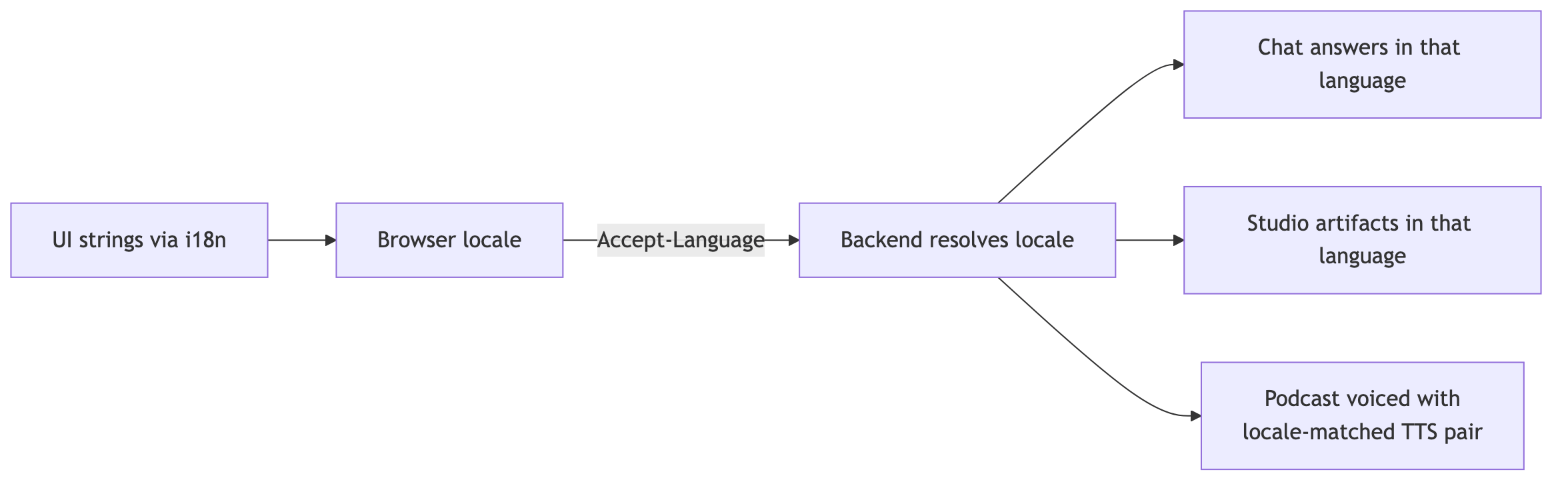
Switch the language and everything follows: the interface, the chat responses, and the generated studio content. Ask for a study guide in French, get a French study guide. Generate an audio overview in Spanish, and it’s voiced by a Spanish-speaking host pair — because each supported locale is mapped to its own carefully chosen neural voices.
The supported set spans Tier-1 and Tier-2 locales — English, Spanish (Latin America and Spain), French, German, Italian, Dutch, Swedish, Brazilian Portuguese, Japanese, Simplified Chinese, and Arabic — with the plumbing designed so adding another is a checklist, not a rewrite.
The demo at the bottom shows this live: the same source material, rendered as chat, study guides, and audio across multiple languages.
Part 4: The Personas — Same Content, Different Teacher
One document can be taught a dozen ways, and the app leans into that.
The two podcast hosts — a curious interviewer and a knowledgeable expert — are a persona pairing you can rename and re-voice. Want a different vibe? Different names, different voices, different language.
The tutor persona in chat is deliberately shaped by its system prompt: format for comprehension (tables for comparisons, numbered steps for processes, bold key terms), stay grounded in the sources, always cite. It behaves like a good teaching assistant, not a know-it-all.
Bring-your-own-model. Because the backend routes through a model-agnostic layer, you can point any generator — chat or studio — at different models. A cheap, fast model handles routing; a stronger model handles the writing. Swap in whatever fits your budget and quality bar.
The upshot: the same uploaded material can become a breezy podcast for a commute, a rigorous study guide for exam week, or a quick FAQ for a refresher — each with a tone that suits the moment.
Part 5: The Secret To Doing This Cheaply
Here’s the design decision I promised.
Every expensive operation — a study guide, a quiz, an audio overview — is cached against a unique hash of its exact inputs. The cache key is a SHA-256 fingerprint of the source text plus the parameters that would change the output: the length, the language, the model.
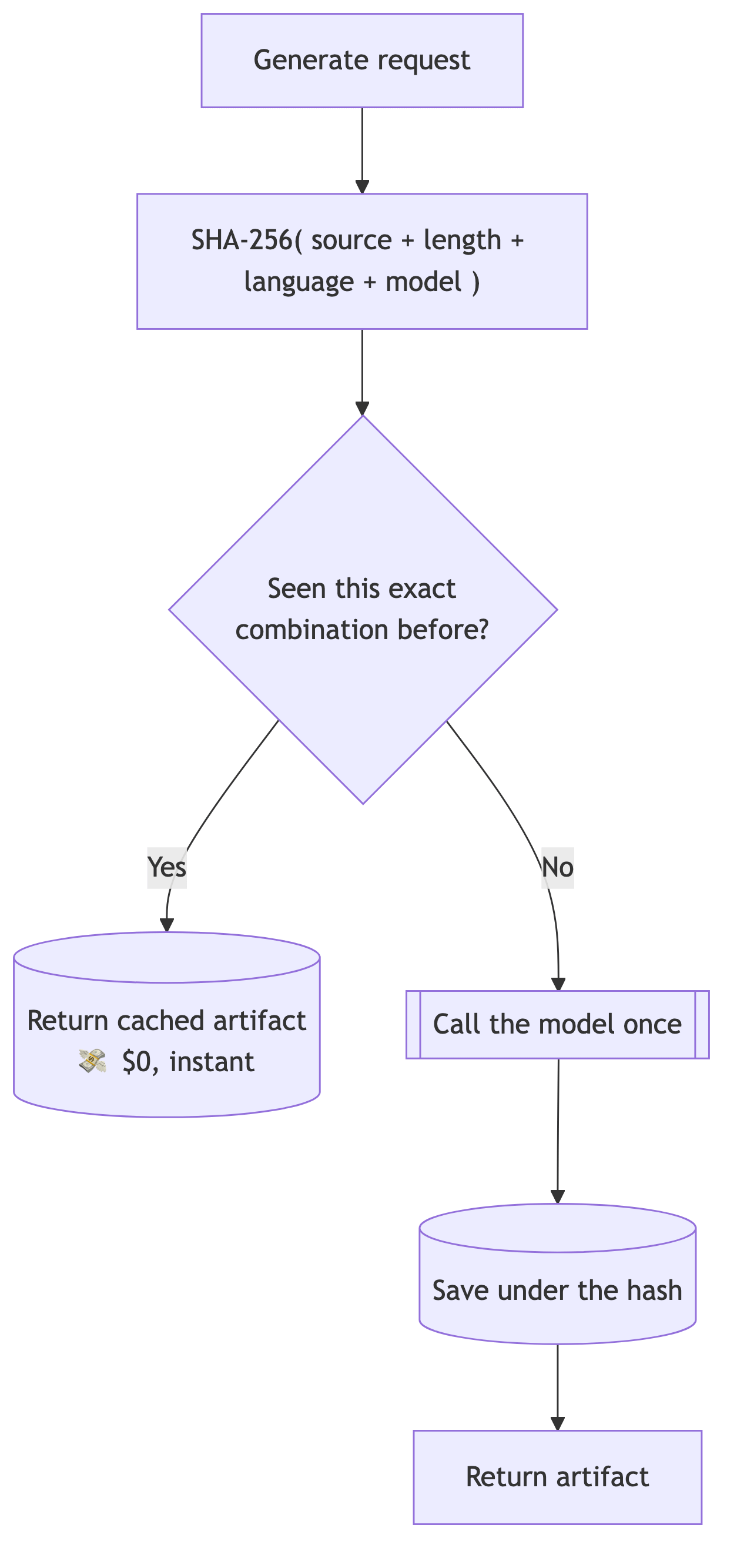
The consequences are lovely:
Regenerating the same thing is free and instant. Ask for that Chapter 2 study guide again? You get the cached copy — no model call, no cost. This applies to any user that is using the same ‘content’. You can’t upload the same thing twice - as it will recognize it. Users simply get references to content.
Change anything meaningful and you get a fresh result. Different chapter, different language, different length, different model → different hash → new generation. Content-addressed caching means the cache is never stale and never wrong.
Costs collapse in real use. In a classroom or a team, people ask for the same artifacts over and over. The first person pays a few tenths of a cent; everyone after pays nothing.
Pair that with a cheap router model gating retrieval and a model-agnostic layer that lets you pick the least-expensive model that meets your quality bar, and the whole system runs for a rounding error compared to what people assume “AI features” cost.
Powerful and inexpensive isn’t a contradiction here — it’s the whole point.
Under The Hood, At A Glance
For the technically curious, the full stack:
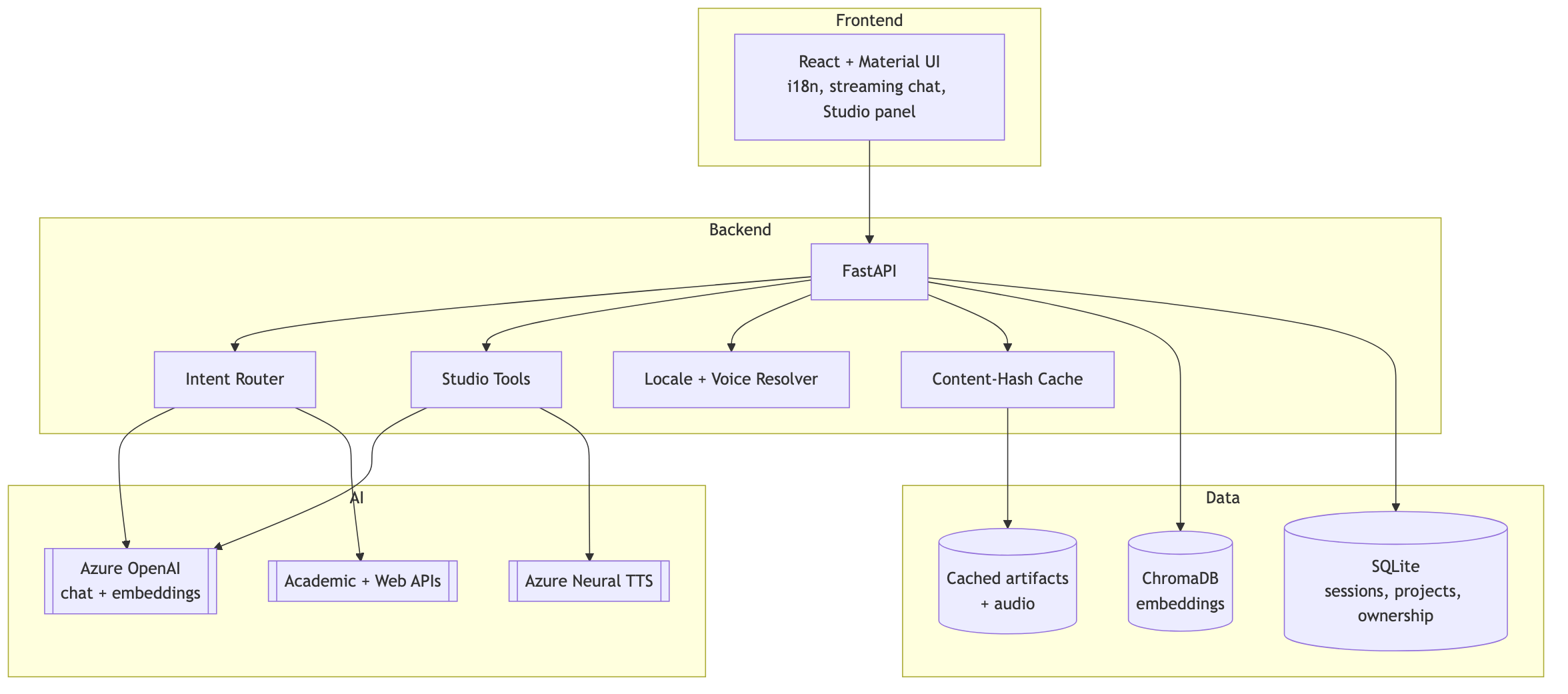
Frontend: React with a streaming chat interface, a Studio panel, and full i18n.
Backend: FastAPI orchestrating retrieval, generation, routing, localization, and caching.
Vector store: ChromaDB holding the embeddings, with every query scoped to what you’re allowed to see.
Sources pipeline: adapters for PDFs, notes, Word docs, PowerPoint, Excel, webpages, audio, and YouTube — each normalized into the same searchable shape.
AI providers: Azure OpenAI for chat and embeddings, Azure Neural TTS for voices, and a shelf of academic APIs for real research — all behind a model-agnostic layer so you’re never locked in.
All of this components have production ready equivalents. Remember it is running locally on my PC/Mac and the currently structure is base on that.
Why This Matters
NotebookLM proved the concept: documents can become conversations. But the “magic” was never proprietary. It’s the orchestration — the right model, given the right context, in the right format, at the right moment.
Once you see it that way, the ceiling lifts. You can add real academic research. You can generate seven kinds of study material instead of one. You can localize the entire experience — content and voice. And you can make it cost almost nothing with content-addressed caching.
That’s the whole story: a handful of well-understood building blocks, orchestrated with care, that add up to something that genuinely helps people learn — in their language, in their format, on their budget.
🎬 See It Live: The 13-Minute Demo
Reading about it is one thing. Watching it is another. I recorded a complete 13-minute walkthrough that shows most everything end to end:
Generating the full Studio suite — audio overviews, study guides, quizzes, flashcards, briefing docs, FAQs, and mind maps
The same material rendered across multiple languages — including podcasts voiced in each one
The instant, free regeneration that content-hash caching makes possible
Built with FastAPI, React, ChromaDB, Azure OpenAI, and Azure Neural TTS. The best part wasn’t any single component — it was watching them add up to something that teaches.
If you found this interesting, subscribe — I’ll be sharing more on how these pieces fit together, and how to build AI features that are powerful and cheap.
👍
👍