

Buffer: an always-on autopilot for Azure capacity reservations
Maintaining a buffer or par level amount of SKUs across regions, zones to ensure you can deploy

Buffer: an always-on autopilot for Azure capacity reservations
If your workloads depend on specific, in-demand VM sizes — storage- and
compute-optimized families, GPU and inference SKUs, constrained regions, anything
scarce — you have probably felt the pain: you go to scale out and Azure answers withAllocationFailed. Capacity for popular SKUs is not guaranteed to be there the
moment you ask for it. That is exactly what On-Demand Capacity Reservations
(ODCR) are for: you reserve the capacity before you deploy, and Azure holds it
for you.
The catch is that acquiring reservations is opportunistic. When a region is
tight you often can’t grab the whole block at once — you take what’s available now
and keep trying for the rest. Do that by hand across a dozen (or a hundred)
subscriptions and you end up in one of two bad places: overpaying for
reservations someone forgot to trim, or firefighting when capacity quietly
evaporates before a big scale-up. There is no reorder point, no inventory
discipline, and no single place to govern it all.
Buffer brings a warehouse-inventory mindset to compute capacity. You declare a
target level per SKU, and a tiny, cheap, always-on control loop keeps you topped
up — acquiring shortfalls largest-block-first, backing off intelligently when
capacity or quota runs out, and self-healing on every cycle. Authority is
granted once at the management-group scope, while the buffers themselves live in
a central hub subscription (or directly in each target subscription) — never in
the management group itself, since reservations are subscription-scoped. The payoff:
capacity is there when your workloads arrive, governed centrally, at near-zero
automation cost.
This post walks through how it works — the architecture, the reconciliation loop
that powers it, and the design decisions that keep it cheap and safe.
What it actually is
Azure On-Demand Capacity Reservations (ODCR) let you reserve compute capacity
for a specific VM SKU in a specific region/zone, before you deploy VMs —
guaranteeing reserved capacity is held for your use (subject to quota and
subscription limits). Note that ODCR holds capacity for the current
reservation; it does not guarantee future expansion, and is still subject to
quota, regional limitations, and SKU retirement. See the
capacity reservation overview.
The problem Buffer solves: capacity for in-demand SKUs (storage- and
compute-optimized families such as Lasv3, Laosv4, Laosv5, Fsv2; GPU and
inference families such as NC, ND, and NV series; constrained regions) is
not always available at the moment you ask for it.
Acquiring it is often an opportunistic, retry-over-time activity — and doing
that by hand across many subscriptions does not scale.
Buffer treats reserved capacity like warehouse inventory:
You declare a desired buffer level (target reserved instance count) per SKU
family / specific SKU, per region, per zone.A scheduled control loop continuously compares current vs desired.
When short, it attempts to acquire the shortfall — trying large reservation
blocks first and backing off to smaller block sizes when capacity is not
available.It does this centrally: authority is granted at the management group level,
while the reservations themselves are placed in a central hub subscription (or
directly in the target subscriptions) that need them.
The goal is a small, cheap, always-on “autopilot” — not a large platform.
Why “buffer level”?
“Buffer level” is an inventory term: the minimum quantity of an item you keep on
hand. When stock drops below buffer, you reorder up to buffer. Mapped to capacity:
Item / SKU → Compute SKU (e.g.
Standard_L8as_v3)Buffer level (target stock) → Desired reserved instance count
On-hand stock → Currently reserved instance count
Reorder → Create/extend capacity reservation
Backorder / partial fill → Acquire what’s available now, retry the rest later
Warehouse → Region + Availability Zone
The system is declarative: you state the target; the loop converges toward it.
The Azure building blocks
Capacity Reservation — Reserves N instances of one VM size in a region
(optionally zone-pinned). Billed whether or not VMs run.
OverviewCapacity Reservation Group (CRG) — A container that holds one or more capacity
reservations. VMs/VMSS associate to the group.
Create CRGAssociate workloads — VMs and Virtual Machine Scale Sets opt into a CRG to
consume reserved capacity.
Associate a VMSharing a CRG — A CRG can be shared across subscriptions in the same tenant,
enabling central ownership + multi-subscription consumption. Requires explicit
sharing configuration and RBAC permissions in participating subscriptions.
Modify a capacity reservationManagement group — A scope above subscriptions for governance, policy and RBAC
inheritance.
MG overviewQuota / usage — Reservations consume regional vCPU quota for the SKU family —
acquisition can fail on quota or on physical capacity.
Quota REST
One nuance worth internalizing up front: a capacity reservation is a
subscription-scoped resource — you cannot create one “in” a management group.
The management group is where governance and identity authority live; the
reservations themselves are always created in subscriptions — a central hub
subscription, or the target subscriptions directly.
The architecture at a glance
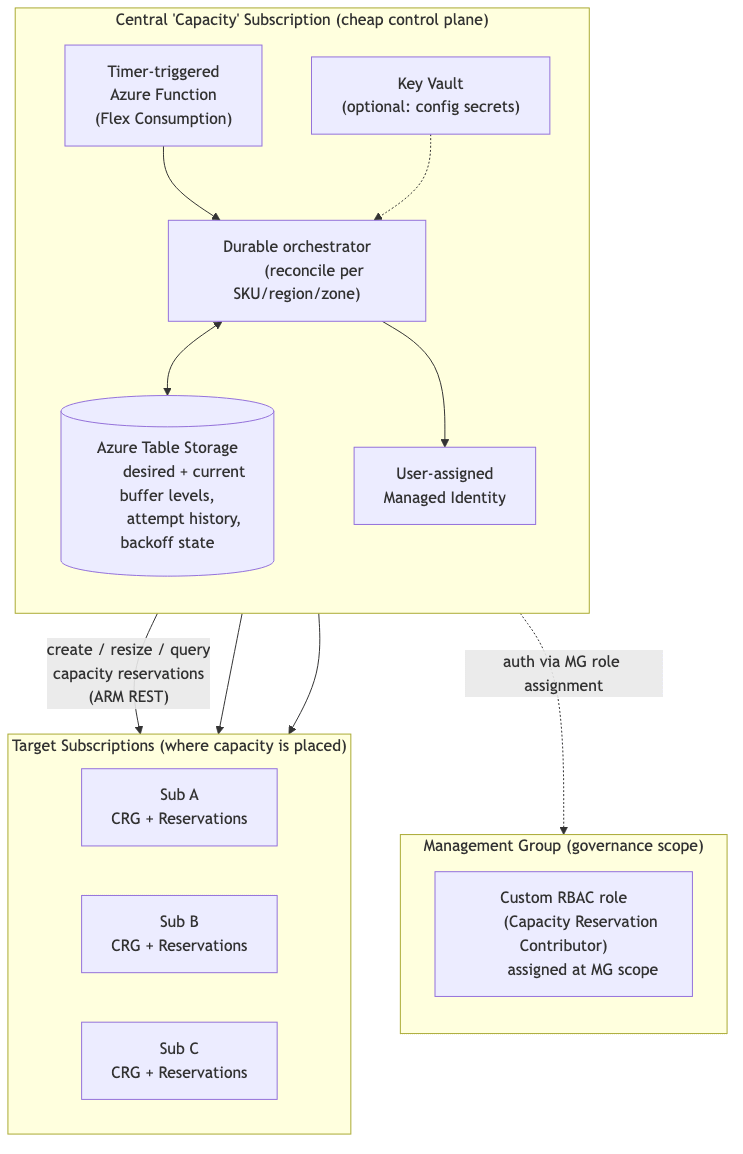
The design principles are deliberately minimal:
One tiny always-on control plane in a dedicated hub (capacity) subscription.
Authority to act on any child subscription comes from a single role
assignment at the MG scope, inherited down — no per-subscription wiring.All durable state in Table Storage (cheapest practical store).
Everything authenticates with Managed Identity — no secrets to rotate.
Distributing from the management group into subscriptions
Because reservations are subscription-scoped, “do it at the management group” means:
govern + authorize at the MG, hold capacity in a hub subscription (or each target
sub). Two distribution patterns are supported, selectable per SKU policy:
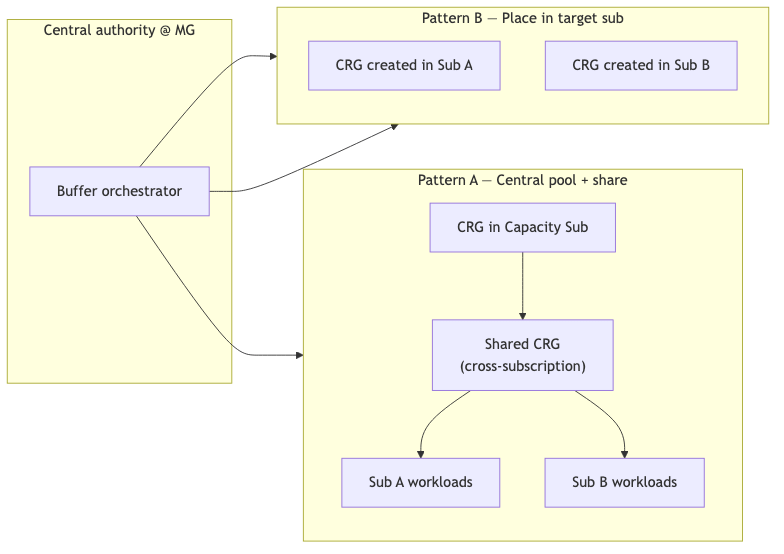
Pattern A — Central pool + share. All reservations held in one hub (capacity)
subscription; the CRG is shared to consumer subscriptions which associate their
VMs/VMSS to it. Note: a single shared CRG currently fans out to a bounded number
of consumer subscriptions (~100, soft/hard TBD). Best when you want one inventory
pool drawn down by many subscriptions, within the sharing fan-out limit.
Pattern B — Place in target sub. Orchestrator creates/tops up a CRG directly in
each target subscription per its own buffer level. Best when subscriptions need
isolated, independently-billed reservations, or you must scale past Pattern A’s
sharing limit.
The decision (A vs B), target subscription list, and per-SKU targets are data,
stored in the state store — not code. Relevant docs:
Create CRG ·
Modify / share CRG ·
Associate workloads.
Scaling Pattern A past the ~100-subscription sharing limit
Pattern A (the central shared pool) is the simplest mental model — one pool, many
drinkers — but it does not scale indefinitely. A single shared CRG can be shared
to a bounded number of consumer subscriptions (observed at 100). Whether
that ceiling is a soft limit (raisable via support/quota request) or a hard
architectural limit is TBD and must be confirmed with the capacity
reservation product team before designing around it. Treat the ~100 figure as a
planning assumption, not a guarantee: if it’s raisable, the sharding below
becomes optional; if it’s hard, sharding (or falling back to Pattern B) is
required to exceed it.
One-to-many SKU:zone → CRG (sharding to grow past the limit). Today the model
implicitly assumes one CRG per SKU:zone in the hub subscription. To
accommodate >100 consumer subscriptions under Pattern A, the model must allow a
one-to-many relationship — multiple CRG shards for the same SKU:zone, each
sharing to a disjoint group of consumer subscriptions:
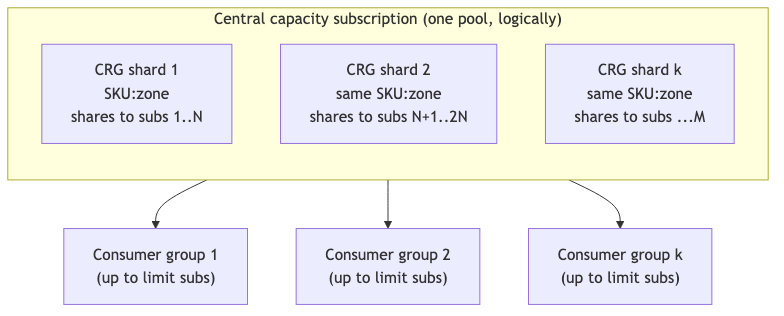
The reconciliation target key becomes SKU : zone : shardId rather than justSKU : zone, the buffer level for a SKU:zone is the sum across its shards,
and the loop must decide which shard a new consumer subscription is assigned to
(bin-packing against the per-CRG sharing limit).
Per-subscription logical-to-physical AZ mapping must be rationalized.
Availability Zone numbers are per-subscription logical labels — zone-1 in the
provider subscription does not necessarily map to the same physical zone
as zone-1 in a consumer subscription. A shared, zone-pinned reservation is only
useful to a consumer if the consumer’s workload lands in the same physical zone
as the reservation:
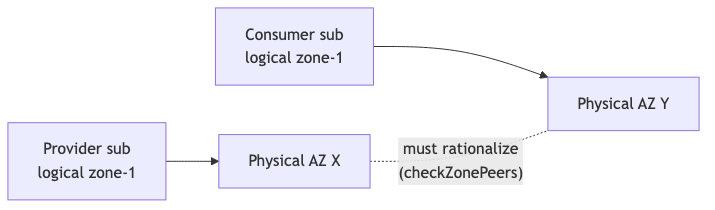
So Buffer resolves each subscription’s logical → physical zone mapping (via the
zone peers API)
and stores the physical zone alongside the logical one, pinning reservations
and advertising them to consumers in physically-aligned zones.
The reconciliation loop
A Timer trigger wakes the function on a configurable schedule (default:
every 15 minutes). Two logical phases: validate (always) and top up (only
when short). This mirrors a reconcile-to-desired-state controller. In one line:
every cycle — load targets → check current vs desired → if below buffer, try to
acquire → update state → idle until the next tick.

What makes this cheap and robust:
Idempotent: every run re-derives reality from ARM, so a missed/failed run
self-heals on the next tick.Validate is cheap: if everything is at buffer, the run is just read-only ARM
queries — low cost.Top up only on shortfall, and only when not inside a backoff cooldown.
Implemented with Durable Functions so per-item retries, timers and fan-out are
managed reliably. See
Durable Functions overview
and Timer trigger.
A schedule you can tune without redeploying logic
There are two independent controls. First, the global tick — the Timer trigger
schedule, supplied via app setting as an
NCRONTAB expression
so it changes by configuration, not a code edit:
// host-level binding reads the schedule from an app setting (%...%)
{
  "schedule": "%BUFFER_SCHEDULE%"   // e.g. "0 */15 * * * *" = every 15 minutes
}
Example values for the BUFFER_SCHEDULE app setting:
0 */15 * * * *— Global tick, every 15 minutes0 */5 * * * *— Aggressive, every 5 minutes0 0 */1 * * *— Relaxed, hourly
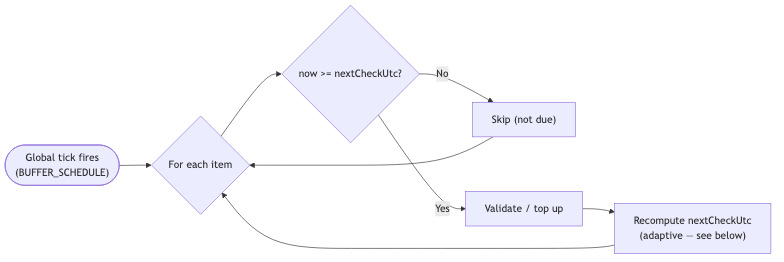
Second, per-item cadence — how often each SKU target is actually processed. The
global tick fires often and cheaply; on each tick the loop only acts on items
whose own cadence is due. Each row carries a nextCheckUtc watermark, and an item
is processed only when now >= nextCheckUtc. This lets you poll a scarce SKU every
tick while polling a stable one hourly — all under a single cheap global timer.
Adaptive cadence: a frequency that breathes
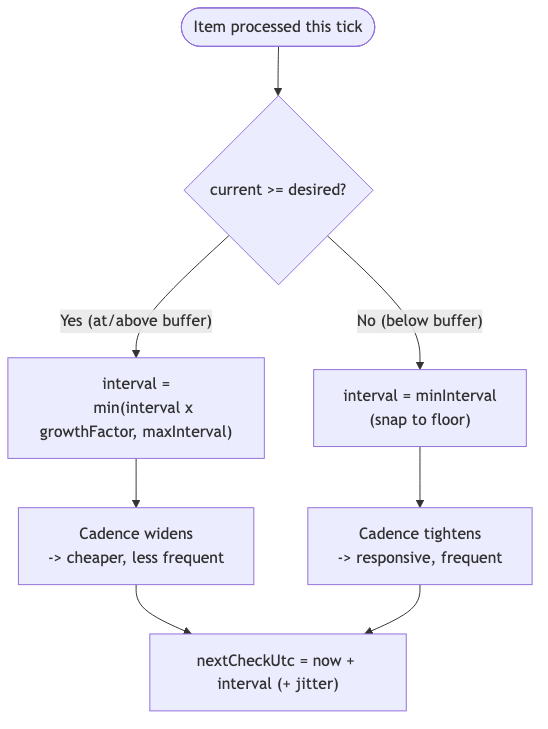
The per-item interval breathes: it widens (less frequent) while an item is
healthy and snaps tight (most frequent) the moment it falls below buffer. This
keeps cost minimal when everything is calm, yet reacts fast when capacity is needed.
The rule is deliberately asymmetric — slow to relax, fast to react:
At / above buffer (
Healthy) — Relax:interval = min(interval × growthFactor, maxInterval)each healthy tick.Just dropped below buffer — Snap to floor:
interval = minIntervalimmediately
(don’t ease in).Recovering / topping up — Stay at/near
minIntervaluntil back at buffer, then
begin relaxing again.
There’s a subtlety here. “Below buffer” has two very different causes, and they must
not fight: capacity is likely available (poll often, good), or allocation keeps
failing (AllocationFailed) where polling every few minutes is wasteful. Buffer
resolves this by keeping two independent clocks and always taking the later:
Cadence clock (
nextCheckUtc) — Adaptive; breathes with health (relax / snap).Acquisition backoff clock (
nextAttemptUtc) — Exponential; only grows while
acquisition keeps failing.
The effective next run is effectiveNextRun = max(nextCheckUtc, nextAttemptUtc).
In short: adaptive cadence decides how eagerly Buffer looks; acquisition backoff
decides how patiently it retries. Backoff can only push the next run later, never
earlier. The behaviour is configured per-SKU:
minInterval(e.g.PT5M) — Floor; most frequent (used at/after a drop below
buffer).maxInterval(e.g.PT4H) — Ceiling; least frequent (when stably healthy).growthFactor(e.g.1.5) — How fast cadence relaxes per healthy tick
(15m → 22m → 34m → …).jitter(e.g.±10%) — De-synchronize items so they don’t all wake on the same
tick.
Keeping runs from stepping on each other
A short cadence can fire the next tick before the previous run for the same scope
has finished — and the capacity-reservation write APIs are asynchronous. A CRGPUT/PATCH returns immediately (201/202) and the real work completes later,
polled via the Azure-AsyncOperation / Location
headers.
If a second run starts while the first is still waiting, both can read the same stalecurrentCount, both decide to top up, and double-acquire — a classic race.
The rule: at most one in-flight run per reconciliation scope, guarded by a
singleton lease. Acquire the lease before any write; if it’s already held, skip
this scope this tick. Release on completion; a leaseExpiryUtc lets a crashed run
self-heal. A run that finds a pending async operation does not issue a new
request — it polls the existing one and only then decides the next action.
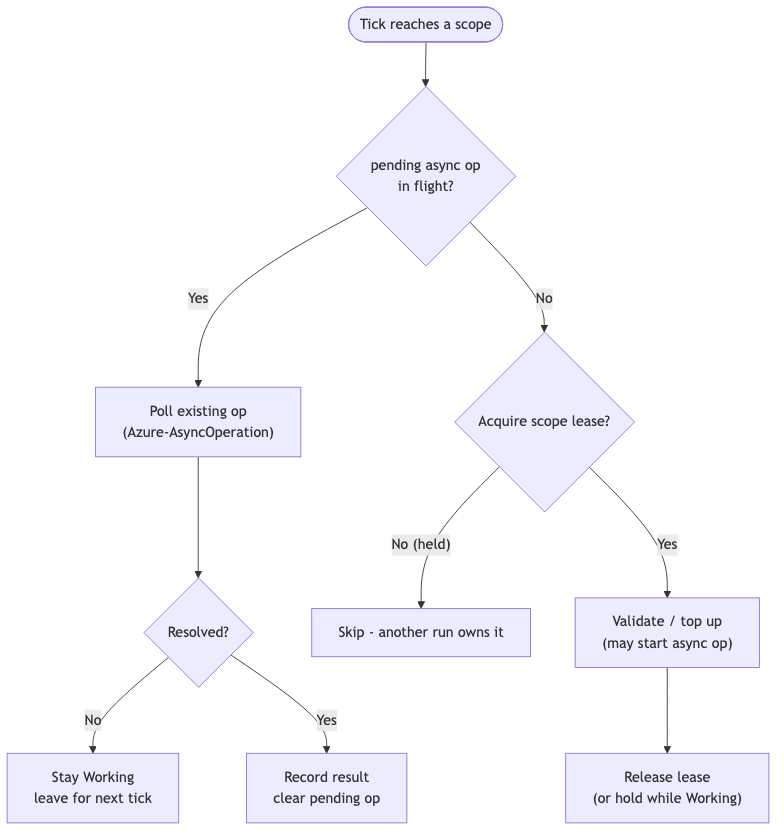
Because the loop is idempotent and level-triggered, skipping a scope that’s
already being worked is harmless — it’s simply picked up on the next tick.
Capacity comes and goes: assignment & release
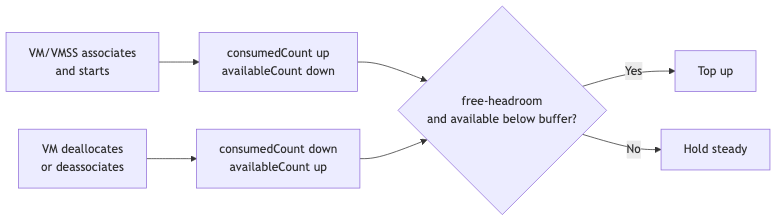
Reserved capacity is not static inventory — it is drawn down and returned as
workloads come and go. When a VM/VMSS associates to the CRG and starts, it
consumes one reserved instance; when it deallocates, that instance is freed
back to the pool. So the loop tracks three numbers, not one:
Reserved (
currentCount) — Total instances held (and billed) in the
reservation.Consumed (
consumedCount) — Held instances currently backing running VMs/VMSS.Available (
availableCount) — Free headroom =currentCount - consumedCount.
That makes “buffer level” mean one of two things, chosen per item via bufferMode:
fixed-pool— Buffer compares againstcurrentCount. Hold a fixed reserved
total regardless of usage (simplest).free-headroom— Buffer compares againstavailableCount. Keep N unused
instances free at all times — as consumption rises, top up so there is always
buffer ahead of demand.
Releasing capacity is deliberately not automatic by default. Capacity given
back is not guaranteed to be re-acquirable for a constrained SKU, so scale-down
is gated behind explicit policy (cost saved vs. risk of losing held capacity).
Release only ever reduces unconsumed instances — a running VM is never stranded.
Zonal strategy
Is capacity held across all three zones at equal levels? Not by default —
and that’s deliberate. Each (SKU, region, zone) is its own row with its owndesiredCount, so zones are reconciled independently. “Equal across all three
zones” is one policy (zoneStrategy = balanced), not a built-in assumption —
because capacity availability is per-zone and a rigid equal target can wedge
below buffer when one zone is starved while others have room.
balanced— Split buffer evenly across the region’s zones. Best for
AZ-resilient workloads that must survive losing one zone.weighted— Per-zone weights (uneven split). Best when one zone is cheaper,
larger, or more reliably available.pinned— All buffer in one zone. Best for zone-anchored workloads, or when
only one zone offers the SKU.regional— Non-zonal reservation (no zone pin). Best when zone alignment
doesn’t matter; widest shot at capacity.
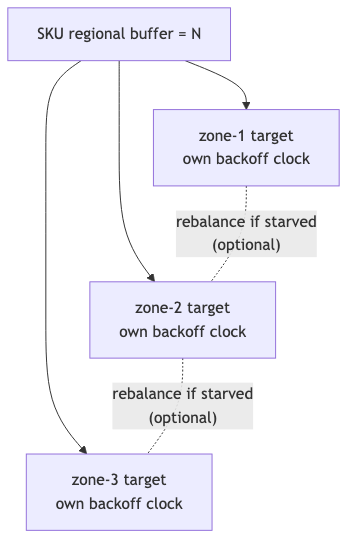
Two rules make balanced robust rather than brittle: independent per-zone
backoff (a starved zone backs off on its own clock without blocking zones that
still have capacity), and optional rebalancing (allowZoneRebalance) — if a
zone can’t fill, the loop may temporarily overfill another to keep total
regional buffer met, off by default since it weakens AZ-loss guarantees.
Where the pattern comes from: Kubernetes
This is the same control loop that powers Kubernetes — and, more specifically,
the way a cluster grows its node pools. Both are declarative, level-triggered
controllers: they observe current state, compare it to a declared desired state,
and act to close the gap, every tick, forever.
“A controller tracks at least one Kubernetes resource type… the controller(s)
for that resource are responsible for making the current state come closer to that
desired state.” — Kubernetes controllers
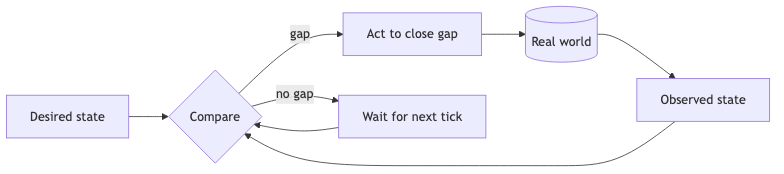
How the Kubernetes concepts map onto Buffer:
Desired state — Kubernetes:
replicas: N, node pool min/max. Buffer: buffer
level per SKU.Observed state — Kubernetes: running pods / nodes. Buffer: reserved instances.
Reconciler — Kubernetes: Deployment controller / Cluster Autoscaler.
Buffer: Timer-triggered Function.Action — Kubernetes: schedule pods / add nodes. Buffer: create / extend
capacity reservation.Backpressure — Kubernetes:
Pendingpods, no capacity. Buffer:AllocationFailed.Recovery — Kubernetes: exponential backoff per node group. Buffer: size + time
backoff per SKU.
The closest analogue is the node-pool scale-up path. The
Cluster Autoscaler
sees unschedulable pods, asks the cloud provider for more nodes, and — when the
provider has no capacity for that VM SKU — marks the node group as failed,
applies an exponential backoff, and tries a different group. Buffer hits the
identical wall (AllocationFailed) and responds the same way. The one deliberate
difference is the trigger source: Kubernetes autoscaling is demand-driven (scale
up because workloads are pending now), while Buffer is inventory-driven — hold
capacity ahead of demand so it’s there when workloads arrive. Same loop, but
pre-warming the warehouse rather than reacting to the checkout queue.
Backoff: how it acquires opportunistically
Capacity is acquired opportunistically. Buffer tries to grab it in large
blocks first (fewer operations, faster fill) and backs off to smaller block
sizes when Azure reports insufficient capacity — then backs off in time before
retrying. Two independent axes:
Size backoff — within a single run, shrink the requested block:
16 → 8 → 4 → 2 → 1.Time backoff — across runs, exponential cooldown after repeated failure to
avoid hammering a constrained SKU/region.
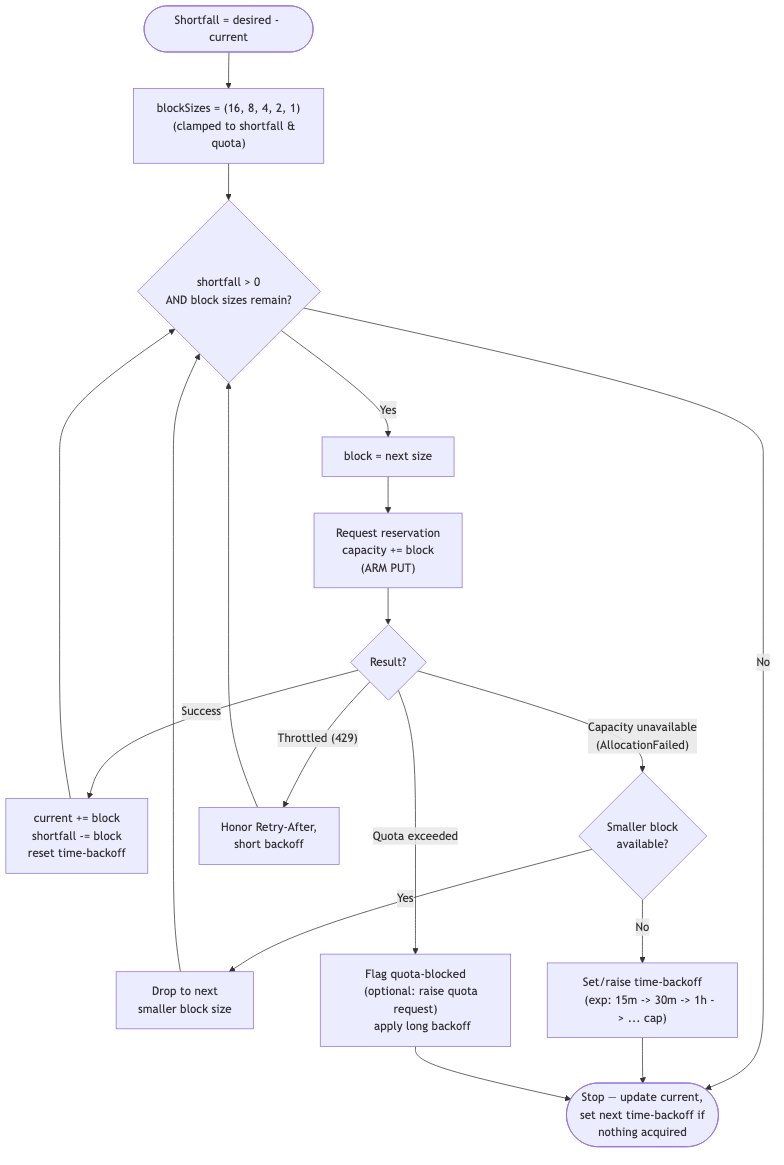
Backoff parameters:
blockSizes(e.g.[16, 8, 4, 2, 1]) — Acquisition granularity, largest-first.timeBackoff(e.g.15m → 30m → 1h → 4h → 12h (cap)) — Cooldown growth on repeated
failure.maxBackoff(e.g.24h) — Ceiling so it keeps probing eventually.jitter(e.g.±10%) — Avoid synchronized retries across SKUs.
Where state lives
State lives in Azure Table Storage — schemaless, pennies-per-month, and ideal
for this key/value-ish workload. The main table (Buffers) holds desired + observed
state, one row per reservation target, tracking everything from desiredCount andcurrentCount through the cadence/backoff clocks (nextCheckUtc, nextAttemptUtc),
concurrency lease (leaseOwner, leaseExpiryUtc), pending async operation, and
quota watermarks. A second append-only table (AttemptLog) keeps an audit trail of
every acquisition attempt and its outcome. Durable Functions keeps its own
orchestration state in the same storage account, so one cheap Standard storage
account covers both control state and durable bookkeeping.
Where it runs, and what it costs
Recommendation: Azure Functions on the Flex Consumption plan, Timer-triggered,
with Durable Functions for orchestration.
Functions — Flex Consumption ✅ (Chosen) — Scale-to-zero, pay only for the
seconds the reconcile runs, modern runtime, built-in Managed Identity.
Flex ConsumptionFunctions — Consumption (Y1) — Viable fallback. Also scale-to-zero; older model,
fine if Flex unavailable in region.Logic Apps (Consumption) — Possible. Good for low-code cron, but backoff/
branching logic is awkward vs code.Container Apps Jobs (cron) — Overkill. Great for containers, but heavier than
needed for a tiny loop.VM / always-on App Service ❌ — Pays 24×7 for a job that runs seconds per hour.
The automation/control plane is engineered to be near-free. (The reservations
themselves are billed at the VM rate whether used or not — inherent to ODCR, and
separate from orchestration cost.) Scale-to-zero compute means no idle charges;
validate-only runs are read-only ARM calls; time backoff prevents wasteful retry
storms; Table Storage is orders of magnitude cheaper than Cosmos/SQL for this shape;
and App Insights sampling caps telemetry spend. In practice the whole control plane
sits within or near the free grants.
Security & RBAC
Managed Identity (user-assigned) on the Function — no secrets, no rotation.
A single role assignment at the management-group scope grants authority across
all child subscriptions via inheritance.Prefer a custom role scoped to exactly the capacity-reservation actions
(least privilege) rather than a broad built-in role.
Indicative custom-role actions:
Microsoft.Compute/capacityReservationGroups/read
Microsoft.Compute/capacityReservationGroups/write
Microsoft.Compute/capacityReservationGroups/capacityReservations/read
Microsoft.Compute/capacityReservationGroups/capacityReservations/write
Microsoft.Compute/capacityReservationGroups/capacityReservations/delete
Microsoft.Compute/locations/usages/read
Microsoft.Quota/quotas/read          # optional, for quota-aware backoff
Microsoft.Quota/quotaRequests/write  # optional, to auto-raise quota
Right-size the action list during implementation; start read-heavy and add write
actions deliberately.
Raising the other ceiling: quota automation
Acquisition can fail for two unrelated reasons: there’s no physical
capacity, or there’s capacity but the subscription has insufficient quota
(regional vCPU limit for the SKU family). Backoff handles the first; quota
automation handles the second — and crucially does so pre-emptively, before
exhaustion blocks a top-up. The core idea: treat quota like a second buffer level.
Watch the headroom between usage and the quota limit; when usage crosses a
high-water mark, request more quota in advance.
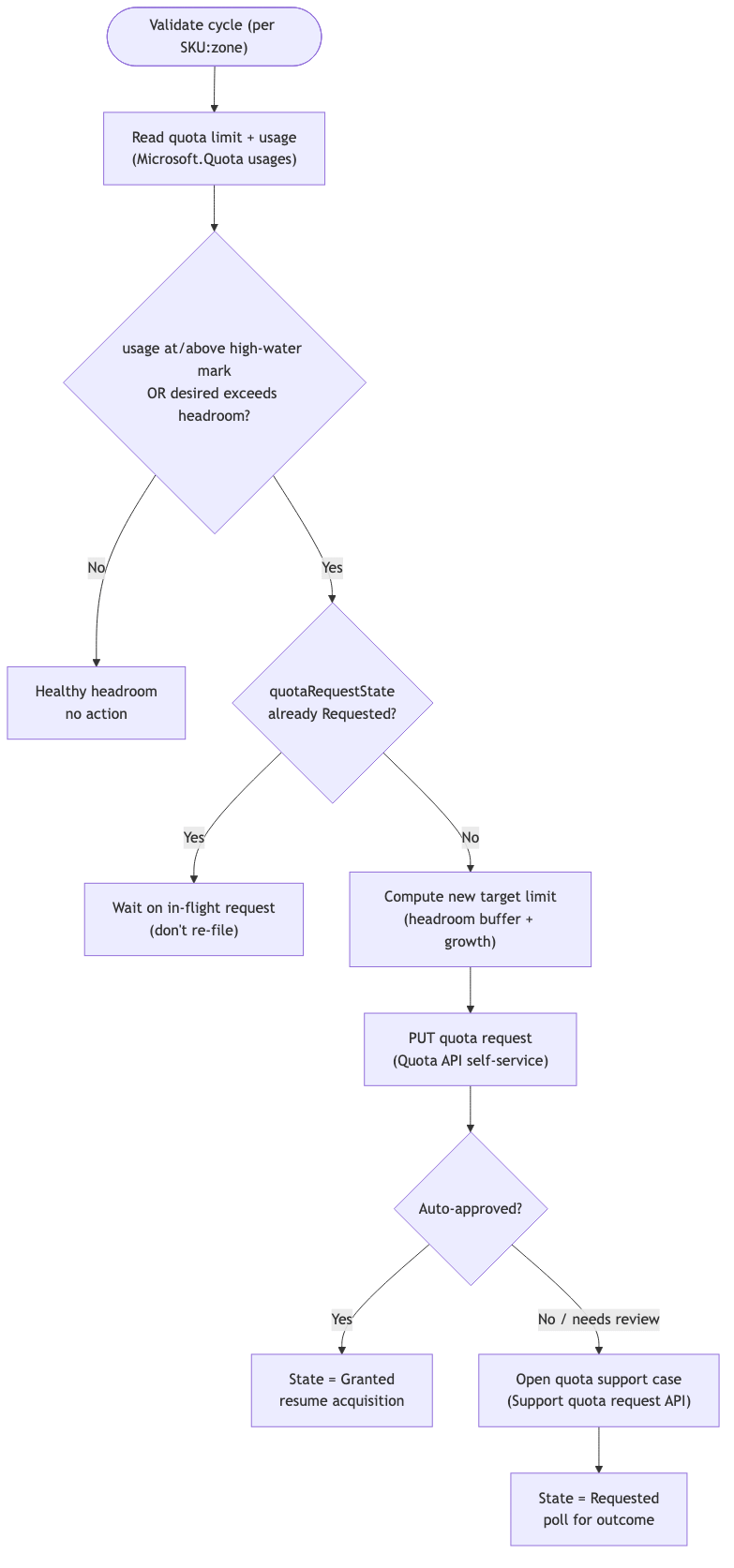
Requests follow a two-tier path — self-service first (the
Azure Quota REST API; many SKU-family
increases are auto-approved instantly), falling back to a support case (the
Support quota request API) when the
self-service request isn’t auto-approved. The loop records the in-flight request so
it doesn’t re-file every tick, polls for the outcome, and resumes acquisition once
the new limit lands. Quota automation only ever raises quota; it never
auto-deploys — it widens the ceiling so acquisition can proceed, keeping the
cost-control and approval semantics of the rest of the system intact.
Pooling multiple SKUs (and multiple sizes)
First, the ODCR reality: a capacity reservation is not core-based. Each
reservation holds N instances of exactly one VM size (e.g. Standard_L8as_v3) —
there is no instance-size flexibility for capacity reservations. You cannot
reserve “96 cores” and let Azure spread them across sizes. Given that, “support
multiple SKUs and pool them” maps onto three distinct layers — only one of
which is core/vCPU-based:
Reservation — Granularity: one exact VM size, one region, (optional) one zone.
Pools across sizes? No — pinned to the size. Core/vCPU-based? No (counted in
instances).CRG (the pool) — Granularity: a group holding many size-specific
reservations. Pools across sizes? Yes — the CRG is the pooling unit.
Core/vCPU-based? No.Quota — Granularity: per VM family, per region. Pools across sizes? Shared by
all sizes in the family. Core/vCPU-based? Yes — measured in vCPUs.
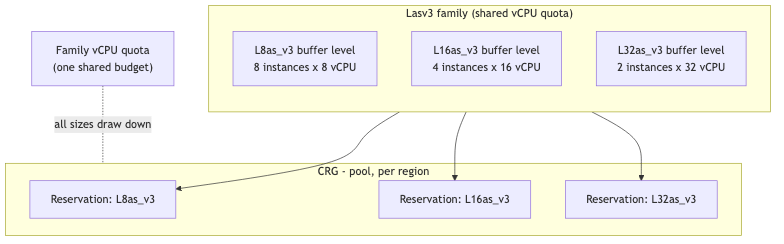
So Buffer keeps buffer levels per exact size (that’s what ODCR actually
reserves), pools them in a CRG, and reasons about vCPU quota at the family
level — the only place “cores” enter the model. When several sizes in a family
compete for one shared quota budget, the loop allocates the scarce quota by
priority (familyQuotaWeight) and flags the family for a pre-emptive quota
request so the ceiling rises before the next pass.
Where it’s heading next
Buffer is intentionally small so it can start delivering value early and iterate.
The open design questions still being worked through:
Distribution default — is Pattern A (central shared pool) or Pattern B
(per-sub placement) the primary model, or a per-SKU choice?Pattern A sharing limit — confirm whether the ~100-subscription shared-CRG
fan-out is soft (raisable) or hard; if hard, sharding or Pattern B is mandatory
beyond it.Zonal default — is
balancedthe defaultzoneStrategy, and when (if ever)
is cross-zone rebalancing on by default?Quota automation policy — is pre-emptive auto-raising on by default per-SKU,
and may the loop open support-case quota requests automatically?Concurrency scope granularity — is the singleton lease taken per CRG, or per
SKU:zone:shard:target?Buffer semantics default — is
fixed-poolorfree-headroomthe defaultbufferMode?Multi-SKU quota arbitration — how is scarce family vCPU quota split across
competing sizes?Scale-down — does Buffer ever release reservations when desired drops, and
how is that approved?Config surface — how are desired buffer levels edited (IaC/GitOps vs. a small
admin API/portal)?Alerting — what conditions should page a human?
Multi-tenant / sovereign clouds — any scope beyond a single tenant?
Further reading
Capacity reservations
Compute / hosting
State & identity
Governance, RBAC, quota